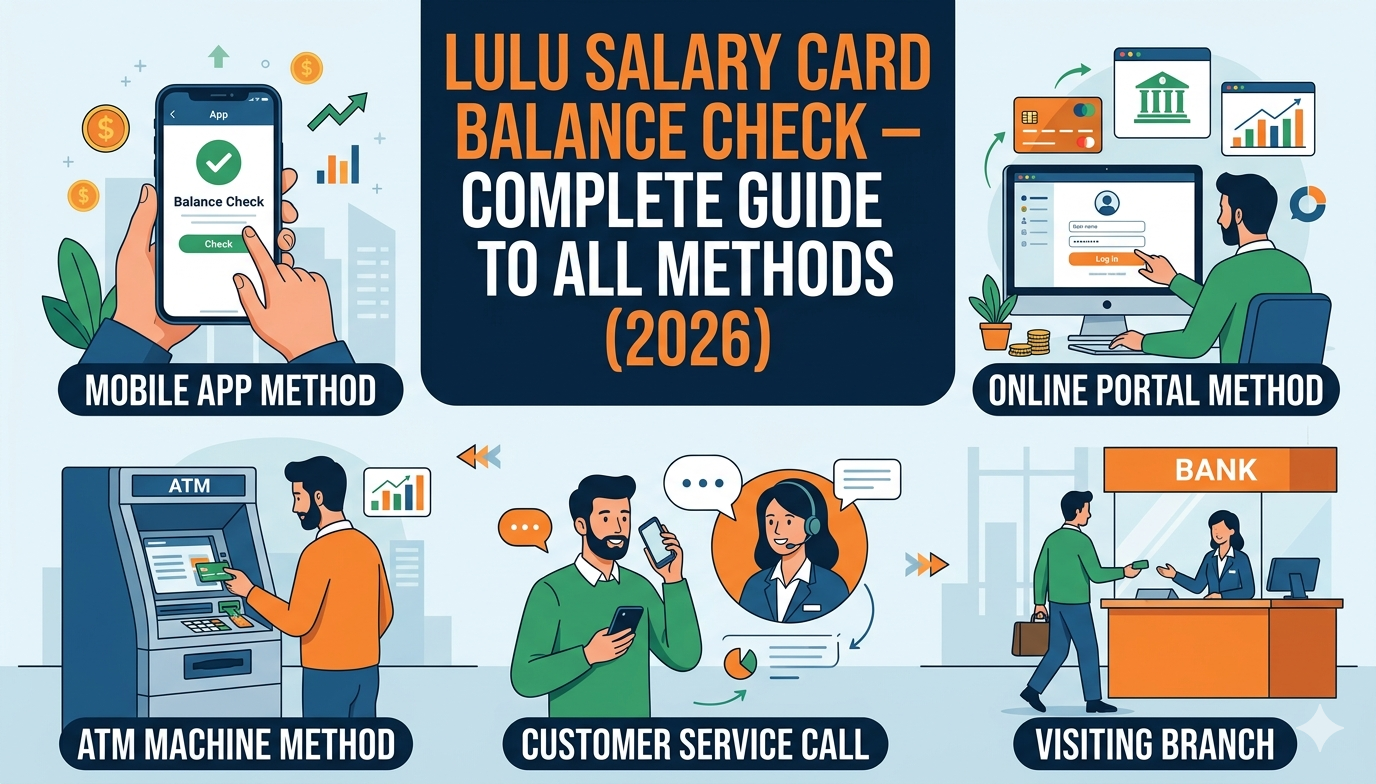
Lulu Salary Card Balance Check – Complete Guide to All Methods (2026)
Performing a lulu salary card balance check is one of the most important habits any UAE employee can build for managing their finances smartly. Whether you receive your wages through the Wage Protection System (WPS), use the Lulu Money app for daily transactions, or depend on your prepaid payroll card for remittances and purchases, knowing your exact available balance at any moment gives you complete financial control. This guide covers every method available — online, mobile app, SMS, ATM, and in-branch — so you can choose the approach that best fits your lifestyle.
What Is the Lulu Money Salary Card?
The Lulu Money Salary Card is a WPS-compliant payroll card issued by Lulu Exchange, one of the UAE’s most prominent financial service providers. Designed for employees who may not have access to regular banking services, this prepaid card enables users to receive, spend, and withdraw their salary without needing a traditional bank account.
The card is embedded with NFC technology for multiple layers of security, allowing users to tap and pay at thousands of retail outlets, restaurants, pharmacies, groceries, and convenience stores, using it just like a debit card. It operates under the UAE Central Bank guidelines and is fully compliant with the Ministry of Labour’s regulations.
Used by over 30,000 corporates and over 400,000 employees, the My Pay My Card program simplifies payroll management while providing easy and instant access to cash through ATMs in the UAE via the UAE SWITCH membership.
Understanding why the card matters is the first step. But understanding how to monitor what’s on it — through a reliable lulu salary card balance check — is what truly empowers the cardholder.
Why Regularly Checking Your Balance Matters
Many employees overlook the importance of regular account monitoring until a payment is declined or an unexpected deduction appears. Performing a lulu salary card balance check on a routine basis offers several practical advantages:
Salary Confirmation
You can instantly verify whether your employer has successfully transferred your wages through the WPS system. Rather than waiting for a paper slip or calling HR, you can see the credit the moment it arrives.
Fraud Prevention
Regularly checking transactions helps ensure no fraudulent activities are taking place on the card. The sooner you spot an unauthorized transaction, the faster you can act.
Budget Management
Tracking every dirham in and out of your account helps you avoid overspending, plan remittances to your home country, and manage monthly bills more effectively.
Reward Monitoring
Keeping an eye on reward points and making redemptions before they expire ensures you extract maximum value from every transaction.
Peace of Mind at the Point of Sale
Nobody wants to be caught at a cashier counter without sufficient funds. A quick lulu salary card balance check before a major purchase eliminates that uncertainty entirely.
Method 1: Checking Balance via the Lulu Money App
The Lulu Money mobile application is widely regarded as the fastest, most feature-rich method for performing a lulu salary card balance check. It provides real-time data, transaction history, spending summaries, and much more — all from the palm of your hand.
How to Use the Lulu Money App for Balance Inquiry
Step 1 — Download the App. Go to the Google Play Store (for Android) or the Apple App Store (for iPhone) and search for “Lulu Money.” Install the official app and wait for it to set up on your device.
Step 2 — Log In or Register. Open the app and tap “Sign In” if you already have an account. If you are new, tap “Sign Up” and enter your name, registered mobile number, email address, and create a secure password. Confirm your identity using the OTP sent to your phone.
Step 3 — Navigate to My Cards. On the home screen, find the “My Cards” section or use the “More” menu to locate your card listing.
Step 4 — Select Your Salary Card. In the My Card page, you will be able to see your Virtual Card in the top section with the available balance. Tap on the Lulu Money salary card to open it.
Step 5 — View Balance. Tap the “Balance Inquiry” option and your current available balance will appear immediately on the screen.
Step 6 — Review Transactions. Scroll down to the transaction history section to view recent credits (salary deposits), debits (purchases), and transfers.
Beyond just a balance inquiry, the card’s integration with the Lulu Money app enables customers to send money, download statements and transaction history, set card usage limits, reset PINs, and block or replace the card.
You can also enable SMS and push notification alerts so you are immediately informed every time a salary deposit lands or your balance drops below a set threshold — a powerful feature for staying on top of your finances without actively opening the app.
Method 2: Checking Balance via SMS
For employees who prefer a quick, internet-free approach, the SMS method provides near-instant results and works from anywhere in the UAE, even in areas with limited data connectivity.
SMS Balance Check Steps
Step 1 — Open the default messaging app on your registered mobile phone.
Step 2 — Compose a new message. In the body of the message, type: BAL followed by a space and then your full Lulu card number or National Identification Number (NIN). For example: BAL 1234567890
Step 3 — Send this message to 51199, the number Lulu Exchange uses for balance enquiries.
Step 4 — Within a few seconds, you will receive an automated SMS reply showing your current card balance.
Important Notes:
- The mobile number you send from must be the same number registered with your Lulu Exchange account.
- Standard SMS charges may apply depending on your mobile network plan.
- This method works 24 hours a day, 7 days a week.
- Save the reply message for your own records.
This approach is particularly useful for construction workers, outdoor laborers, and field staff who may not always have smartphone access but need to quickly verify whether their salary has been credited before making a significant purchase.
Method 3: Checking Balance at an ATM
The ATM method for a lulu salary card balance check is perhaps the most universally accessible, requiring no smartphone, no internet, and no data plan — only your physical card and your PIN.
ATM Balance Inquiry Steps
Step 1 — Locate an ATM that accepts Lulu salary cards. Cash withdrawal is available from all branches of Lulu Exchange, Emirates NBD, Emirates Islamic Bank, and Mashreq Bank ATMs in the UAE.
Step 2 — Insert your Lulu salary card into the ATM card slot carefully, making sure it faces the correct direction.
Step 3 — Enter your 4-digit PIN when prompted. Take care to shield the keypad from view as you type.
Step 4 — From the main menu, select “Balance Enquiry” or “Check Balance” from the list of options displayed on the screen.
Step 5 — The ATM will connect to the system and display your available balance on screen.
Step 6 — Choose whether to print a receipt. If you select “Print Receipt,” a paper slip will be issued showing your current balance and the last few transactions.
Step 7 — Retrieve your card before walking away from the machine. Never leave your card behind.
ATMs are available across the UAE around the clock, making this method ideal for those who need an after-hours lulu salary card balance check when branches are closed or when internet connectivity is not available.
Method 4: Checking Balance at a Lulu Exchange Branch
For employees who prefer face-to-face assistance, or those who are unfamiliar with digital tools, visiting a Lulu Exchange branch in person remains a reliable and straightforward option.
In-Branch Balance Inquiry Steps
Step 1 — Locate the nearest Lulu Exchange branch using the branch locator on the official website or app. Most branches operate from 9:00 AM to 9:00 PM, though hours may vary by location.
Step 2 — Bring your Lulu salary card along with a valid form of photo identification, such as your Emirates ID or passport.
Step 3 — Approach the customer service desk and politely inform the staff member that you would like to perform a balance inquiry on your salary card.
Step 4 — The staff will verify your identity and card details before pulling up your account information.
Step 5 — Your current balance and recent transaction history will be shared with you. You can request a printed statement if needed.
The in-branch method is particularly valuable when you need help resolving issues — such as a blocked card, an unrecognized transaction, or a forgotten PIN — that go beyond a simple balance check. Their friendly staff will assist you in checking your salary card balance and addressing any other financial queries you may have.
Method 5: Checking Balance via the Website
Currently, balance checking is only available through the mobile app. The Lulu Money website does not offer direct balance viewing functionality. However, you can still log into your Lulu Money account online to access account information and manage certain settings.
If you are using a desktop or laptop computer, download the Lulu Money app on your mobile and keep it as your primary tool for a lulu salary card balance check, as the mobile platform is where the most features are available.
Comparing All Balance Check Methods at a Glance
| Method | Internet Required | Speed | Available 24/7 | Receipt Available |
| Lulu Money App | Yes | Instant | Yes | Digital |
| SMS (51199) | No | Seconds | Yes | SMS Reply |
| ATM | No | Fast | Yes | Printed |
| Branch Visit | No | Moderate | No (hours vary) | Printed |
| Website | Yes | Moderate | Yes | Limited |
Each method serves a different need. The Lulu Money app is the most powerful option for those who want real-time data, transaction history, and card management. SMS is perfect for quick, on-the-go verification without data. ATMs provide offline access with the benefit of a printed receipt. Branch visits are best for complex account issues or personal assistance.
Key Features of the Lulu Money Salary Card
Understanding the full range of capabilities of the card helps you appreciate why performing a routine lulu salary card balance check is just one small part of a much broader financial toolkit.
WPS Compliance — The card forms part of the MyPay Payroll Program of LuLu Exchange and is aligned to the WPS regulations of the Central Bank of the UAE, ensuring that salary payments are disbursed on time and transparently recorded.
Contactless Payments — The embedded NFC chip allows tap-and-pay functionality at thousands of retail locations across the UAE and internationally.
International Usability — The card works internationally wherever Mastercard or Discover is accepted, subject to fees and limits, making it useful for employees who travel or need to access funds abroad.
Remittance Integration — Cardholders can use the Lulu Money app to send money internationally, often at competitive exchange rates with promotional offers available.
Card Management — Users can block a lost or stolen card, request a replacement, reset their PIN, set usage limits, and download statements — all from within the Lulu Money app.
No Bank Account Required — Even without a traditional bank account, salary earners can still be beneficiaries of payday through Lulu salary card services, making financial inclusion a reality for millions of workers across the UAE.
Security Tips for Safe Balance Management
Performing a lulu salary card balance check regularly is not only about knowing your funds — it is also a key security habit. Here are best practices to keep your account protected:
Use Trusted Networks — Avoid logging into your Lulu Money app on public or shared Wi-Fi networks. Use your personal mobile data for app access.
Enable Biometric Login — Set up fingerprint or Face ID login on the Lulu Money app to prevent unauthorized access if your phone is lost or stolen.
Set Low Balance Alerts — Enable SMS or push notification alerts so you are automatically informed whenever your balance drops below a certain amount.
Monitor Transactions Regularly — Review your transaction history frequently. If you spot any payment you do not recognize, contact Lulu Exchange customer support immediately.
Protect Your PIN — Never share your ATM PIN with anyone, including colleagues, friends, or family members. Change your PIN periodically through the app or at a Lulu Exchange branch.
Block the Card Instantly if Lost — If your card is misplaced or stolen, use the Lulu Money app to block it immediately before visiting a branch for a replacement.
Common Issues and How to Resolve Them
Even with a straightforward system, users occasionally encounter problems when trying to perform a lulu salary card balance check. Here is how to handle the most frequent ones:
App Not Loading — Ensure you have a stable internet connection, then close and reopen the app. If the issue persists, check whether an app update is available in the app store.
Incorrect Balance Displayed — Contact Lulu Exchange customer support directly. Discrepancies can sometimes occur during system maintenance windows, particularly over weekends or public holidays.
Forgotten PIN — Visit a Lulu Exchange branch with your Emirates ID to reset your PIN. You can also use the PIN reset feature within the Lulu Money app.
Card Not Accepted at ATM — Ensure the ATM you are using accepts Lulu salary cards (Emirates NBD, Emirates Islamic, Mashreq, and Lulu Exchange ATMs are all compatible). If the problem continues, contact customer support.
SMS Not Received After Balance Request — Confirm that the phone number you sent the SMS from matches your registered Lulu account number. Also check your network signal and try again.
Salary Not Credited — If your employer claims salary has been disbursed but it is not showing in your balance, contact your employer’s HR or payroll department first, as WPS processing can sometimes take a few additional hours.
LSI and NLP Terms to Know
Understanding terminology related to the Lulu salary card ecosystem helps you navigate services more confidently:
Wage Protection System (WPS) — The UAE government initiative overseen by MOHRE and the Central Bank that ensures all private sector employees are paid on time and in full.
Prepaid Payroll Card — A type of card loaded with salary funds by an employer rather than by the cardholder directly, as opposed to a credit card.
Balance Enquiry — The formal process of requesting the current available amount on a card, whether through app, ATM, SMS, or branch.
NFC (Near Field Communication) — The technology that enables contactless tap-to-pay transactions at point-of-sale terminals.
Transaction History — A digital or printed record of all debits, credits, and transfers that have occurred on an account over a given period.
KYC (Know Your Customer) — The identity verification process required when registering for financial products in the UAE.
PIN Reset — The process of changing or restoring a card’s personal identification number through official channels.
Frequently Asked Questions
How many times can I perform a lulu salary card balance check per day?
There is no official limit on the number of times you can check your balance per day through the app or online. ATM balance inquiries may vary by machine, but are generally unlimited. SMS requests may incur small network charges per message.
Is there any fee for checking my balance?
Checking your balance online, by app, at an ATM, or in a branch is usually free. But sending an SMS may cost a small fee depending on your phone plan.
Can I check the balance of my Lulu card without the app?
Yes. The SMS method (sending BAL followed by your card number to 51199) and the ATM method both work without requiring the mobile app or internet access.
What should I do if my salary is not reflected in my balance?
First, verify the expected payment date with your HR department. Then check whether your employer has processed the WPS file. If the issue remains unresolved after 24 hours, contact Lulu Exchange customer support with your card details for assistance.
Can I use my Lulu salary card for international transactions?
The card works internationally wherever Mastercard or Discover is accepted, subject to fees and limits. Always verify any applicable international transaction fees before using your card abroad.
How do I get a new Lulu salary card if mine is lost or damaged?
Lulu Salary Card can be requested through the Lulu Money Exchange App, where you can block the card, replace it, and request a new card.
Can I check balance for multiple cards in the same app?
Yes, the Lulu Money app supports multiple cards under a single account. However, each card’s balance must be checked individually by selecting that specific card within the My Cards section.
Is it safe to check my balance over a mobile network?
Yes, the Lulu Money app uses SSL encryption and follows strict security protocols, making mobile data connections safe for balance inquiries. Avoid public Wi-Fi for extra security.
Final Thoughts
Managing your finances in the UAE becomes significantly easier when you know exactly how and when to access your account information. Performing a regular lulu salary card balance check is not merely a convenience — it is a financial discipline that helps you avoid surprises, protect your earnings, and make confident spending decisions every day.
Whether you prefer the instant digital experience of the Lulu Money app, the no-internet simplicity of the SMS method, the offline reliability of the ATM, or the reassurance of speaking to a staff member in person at a branch, there is an option perfectly suited to your routine. Each method for a lulu salary card balance check is free or near-free, quick to perform, and available around the clock for most channels.
As the UAE continues to advance its financial inclusion agenda through the Wage Protection System, tools like the Lulu Money Salary Card will remain central to how hundreds of thousands of employees receive and manage their wages. Stay informed, stay secure, and make your money work for you.
Related posts: