FAB Balance Inquiry: The Ultimate Step-by-Step Guide for UAE Residents (2026)
Millions of UAE residents, from salaried professionals to daily-wage workers, need fast and reliable access to their account information at any moment of the day. Whether your salary just arrived, a bill is due, or you simply want to keep your personal finances under control, performing a quick fab balance inquiry is one of the most essential banking habits you can build. First Abu Dhabi Bank — the UAE’s largest financial institution — has invested heavily in digital infrastructure so that every type of customer, from tech-savvy smartphone users to those who prefer traditional ATM banking, can stay informed about their funds without stepping into a branch.
This complete, research-backed guide covers every verified method available in 2026 for performing a fab balance inquiry, including the FAB Mobile App, online banking portal, ATM network, SMS banking, phone banking, the PPC Magnati prepaid portal, the Payit app, and in-branch services. You will also find a dedicated section on Ratibi salary card checks, a security guide to protect your information, troubleshooting tips for the most common errors, and a detailed FAQ section at the end.
What Is FAB and Why Does Your Balance Check Matter?
First Abu Dhabi Bank (FAB) was formed in 2017 following the historic merger of the National Bank of Abu Dhabi (NBAD) and First Gulf Bank (FGB). The combined entity became the UAE’s largest bank by total assets and one of the most significant financial institutions across the entire Middle East and North Africa region. FAB serves millions of customers including UAE nationals, expatriates, corporate clients, and low-income workers on prepaid salary cards.
Keeping a close eye on your account is far more than a casual habit — it is a financial discipline that directly impacts your quality of life. A fab balance inquiry helps you confirm whether your monthly salary has been credited, whether a recent transaction has cleared, or whether there are any suspicious or unauthorized charges on your account. In a country like the UAE where digital payments, international transfers, and prepaid card transactions are part of everyday life, knowing your exact available balance in real time keeps you one step ahead of your finances.
The bank currently serves account holders with a wide range of products including savings accounts, current accounts, iSave accounts, Elite accounts, salary accounts, credit cards, debit cards, and an extensive suite of prepaid cards such as the Ratibi card, Nafees card, PayPlus card, DWALLET, and the Multi-Currency travel card.
Difference Between Available Balance and Ledger Balance
Before diving into the specific methods for checking your balance, it is worth understanding two key terms that appear across all FAB platforms.
Available Balance refers to the funds you can actually spend right now. This figure accounts for any pending transactions, payment holds, or temporary blocks — such as a hotel security deposit or a fuel station pre-authorization. This is the number that matters most for day-to-day spending decisions.
Ledger Balance (also called the total balance or book balance) represents the full amount recorded in your account, including transactions that are still being processed. This figure may be slightly higher than your available balance when there are pending outgoing transactions.
Both figures are displayed when you perform a fab balance inquiry through the mobile app or online banking portal. ATM screens typically show available balance only, while the full banking dashboard shows both values side by side for complete clarity.
Method 1: FAB Mobile Banking App
The FAB Mobile Banking App is consistently ranked as the fastest, most convenient, and most feature-rich channel for everyday banking in the UAE. It is available for iOS (Apple App Store), Android (Google Play Store), and Huawei devices (Huawei AppGallery), and supports biometric login through fingerprint recognition and Face ID technology.
How to Download and Set Up the FAB Mobile App
Setting up the app for the first time is a straightforward process that only needs to be done once. Open your device’s app store and search for “FAB Mobile.” Download the official application published by First Abu Dhabi Bank. Once installed, open the app and begin the registration process. New users will be prompted to enter their card details, verify their identity through Emirates ID scanning, and complete OTP (One-Time Password) verification sent to their registered mobile number. After the initial setup, you can enable biometric login so that future logins take only a second.
Step-by-Step: Performing a FAB Balance Inquiry via the Mobile App
- Open the FAB Mobile app on your smartphone.
- Log in using your username and password, or authenticate instantly with Face ID or fingerprint.
- The home dashboard will display your account balance immediately upon login.
- Tap on the “Accounts” section to view balances for all linked accounts — savings, current, salary, or prepaid cards.
- Select any individual account to view detailed transaction history, including salary credits, bill payments, transfers, and card purchases.
- Use the “Spending Insights” feature to see a breakdown of your monthly expenditure by category.
- Download your account statement in PDF format directly from the app if you need it for visa applications, loan processing, or personal records.
The app also supports push notifications, meaning you can set up real-time alerts for every credit and debit transaction. This feature effectively turns your smartphone into an automatic monitoring system for your account, eliminating the need to manually perform a fab balance inquiry every time a transaction occurs.
Key Features of the FAB Mobile App
| Feature | Details |
|---|---|
| Biometric Login | Face ID and fingerprint supported |
| Real-Time Balance | Available balance shown instantly on dashboard |
| Transaction History | Full history with filter options |
| Statement Download | PDF format, customizable date range |
| Push Notifications | Instant alerts for all transactions |
| Bill Payments | Utilities, telecoms, and credit card bills |
| Fund Transfers | Domestic and international transfers supported |
| Card Management | Freeze, unfreeze, and manage card limits |
| ATM Locator | Find nearby FAB ATMs and cash deposit machines |
Method 2: FAB Online Banking Portal
For customers who prefer managing their finances from a desktop or laptop computer, FAB Online Banking provides a comprehensive portal with access to all account details, transaction records, and banking services. This method is particularly useful when you need to view extended transaction history, download statements, or manage multiple accounts simultaneously.
How to Register for FAB Online Banking
If you have not yet registered for online banking, the process is simple. Open any web browser and navigate to the official First Abu Dhabi Bank website. Click the “Login” button at the top right corner of the homepage. In the dropdown menu, select “Personal Online Banking (UAE).” On the login screen, locate and click the “Register” link. You will be asked to enter your card number, expiry date, and PIN. Next, create a unique username and password. An OTP will be sent to your registered mobile number to verify your identity. Once confirmed, your online banking account is active and ready to use. fewa bill payment
Step-by-Step: Performing a FAB Balance Inquiry via Online Banking
- Open your browser and go to the official FAB website.
- Click “Login” and select “Personal Online Banking.”
- Enter your username and password.
- Complete OTP verification if prompted.
- Once logged in, your account dashboard will display your current and available balance for all linked accounts.
- Click on any account tile to expand the full transaction history.
- Use the “Download Statement” option to export your history as a PDF or CSV file for any required date range.
Online banking is particularly valuable for customers who need to verify salary credits for WPS (Wage Protection System) compliance, review detailed transaction timelines, or access features not available on the mobile app such as certain credit facility management tools.
Method 3: ATM Balance Inquiry
The ATM remains one of the most trusted and widely used channels for a quick fab balance inquiry, particularly for customers who are offline, away from their phones, or simply prefer the reliability of a physical machine. FAB operates one of the largest ATM networks in the UAE with over 400 machines distributed across Abu Dhabi, Dubai, Sharjah, Ajman, Ras Al Khaimah, Fujairah, and Umm Al Quwain.
Step-by-Step: Checking Your Balance at a FAB ATM
- Locate the nearest FAB ATM using Google Maps (search “FAB ATM near me”) or the ATM Locator tool within the FAB Mobile App.
- Insert your FAB debit card, credit card, Ratibi card, or prepaid card into the card slot with the chip facing upward.
- Wait a few seconds while the machine reads your card and displays the welcome screen.
- Select your preferred language — English or Arabic.
- Enter your 4-digit PIN carefully using the keypad. Always cover the keypad with your free hand for privacy.
- Press the green “Enter” or “OK” button.
- From the main menu, select “Balance Inquiry.”
- Choose “Display on Screen” to view your balance instantly, or “Print Receipt” if you want a physical record.
- Your available balance, account number (last 4 digits), and the date and time of the inquiry will be displayed.
- Press “Cancel” or “Exit” when finished and wait for your card to be returned. Never leave the ATM before the screen resets to the welcome page.
Important Notes for ATM Balance Inquiries
Checking your balance at any FAB-owned ATM is completely free for FAB cardholders. However, if you use a non-FAB ATM within the UAE Switch network, a small fee of approximately AED 1 to AED 2 may be charged depending on the ATM operator. International ATM inquiries may also incur currency conversion or network fees.
If you encounter issues such as the card not being read, your PIN being rejected after multiple incorrect attempts, or an error message appearing on screen, do not force the machine. Contact FAB customer care immediately at 600 52 5500.
Method 4: SMS Banking
SMS banking is the ideal solution for customers who need to perform a fab balance inquiry without internet access, a smartphone, or a data connection. It works using a standard text message sent from your registered mobile number to a designated FAB short code.
How to Set Up FAB SMS Banking
Before you can use SMS banking, you must register your mobile number with FAB. This can be done at any FAB branch or through the FAB Mobile App under banking preferences. During registration, you will create a separate SMS PIN that is distinct from your ATM PIN. Keep this PIN private and never share it with anyone.
How to Check Balance via SMS
Once registered, send a text message with the keyword CBAL followed by the last 4 digits of your card number to 2121 from your registered mobile number. You will receive an automated reply containing your current available balance within a few minutes.
If you do not receive a reply within 2 minutes, resend the message. Note that while FAB does not charge for this service, your mobile network operator (such as Etisalat, du, or Vodafone) may apply standard SMS rates.
SMS banking is especially popular among Ratibi salary card holders, security staff, drivers, laborers, and workers in industrial areas where smartphone access is limited or internet connectivity is unreliable.
Method 5: Phone Banking and FAB Customer Care
FAB’s phone banking service allows customers to perform a fab balance inquiry by calling the bank’s official helpline and following the IVR (Interactive Voice Response) menu. This method works 24 hours a day, 7 days a week, and does not require internet access, a smartphone, or any digital setup.

FAB Customer Care Contact Numbers
| Region | Contact Number |
|---|---|
| Within UAE | 600 52 5500 |
| International | +971 2 681 1511 |
Step-by-Step: Checking Balance via Phone Banking
- Call 600 52 5500 from your registered mobile number.
- Listen to the IVR instructions and select the option for “Balance Inquiry.”
- The automated system will verify your identity by asking for your card number or registered details.
- Your available balance will be announced during the call.
- If you need to speak with a human agent, the FAB Virtual Agent — a new multi-factor authentication feature — will assess your request and either assist you directly or connect you with a live Customer Service Representative.
Phone banking is particularly recommended for customers experiencing technical issues with the mobile app, those who have forgotten their digital banking credentials, and elderly customers or those unfamiliar with digital platforms.
Method 6: PPC Magnati Prepaid Card Inquiry Portal
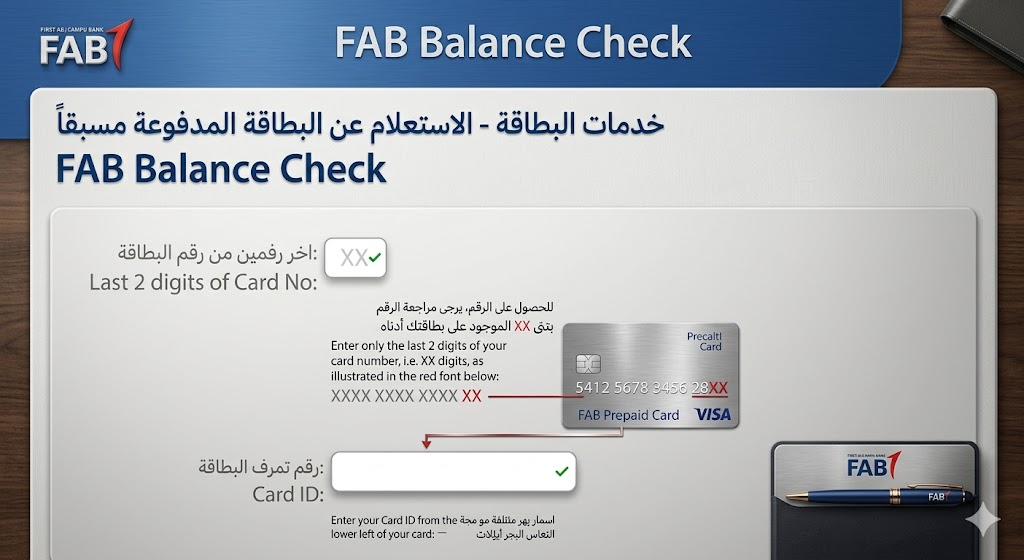
The PPC Magnati Prepaid Card Inquiry Portal is a dedicated online platform designed specifically for FAB prepaid cardholders. It allows users to check their balance without logging into full online banking, making it the simplest and most direct option for Ratibi card users and other prepaid card customers.
This method is completely free and does not require account registration or password creation. The portal uses SSL (Secure Socket Layer) encryption to protect your information during every session.
Step-by-Step: Using the PPC Magnati Portal for FAB Balance Inquiry
- Open any web browser on your smartphone, tablet, or computer.
- Navigate to the official PPC Magnati prepaid inquiry page.
- Enter the last 4 digits of your FAB prepaid card number in the first field.
- Enter your Card ID — this is a unique identifier printed on the front or back of your card.
- Complete the CAPTCHA verification to confirm you are a human user.
- Click the “Go” button to proceed.
- Your current balance, available balance, and recent transaction history will be displayed immediately on screen.
If you see an error message stating “Invalid Card Details,” double-check the last 4 digits and the Card ID. A common mistake is confusing the Card ID with the full card number. For reloadable cards such as gift cards or travel cards, the portal will also provide direct links to the Payit app or FAB branch locator for adding funds.
Method 7: Payit App for Prepaid Card Balances
The Payit app is FAB’s dedicated digital wallet platform designed specifically for prepaid card users including Ratibi card holders, Nafees card users, PayPlus card users, and DWALLET account holders. It provides a real-time view of card balances after a simple one-time linking process.
How to Link Your Prepaid Card on Payit
- Download the Payit app from the App Store or Google Play Store.
- Open the app and tap “Sign Up.”
- Select your FAB prepaid card type — Ratibi, Nafees, ADSSA, DWALLET, or another option.
- Scan your Emirates ID using the phone’s camera.
- Verify the scanned details and tap “Confirm.”
- Complete any remaining identity verification steps.
- Once linked, your card balance will appear on the Payit home screen in real time.
If your balance is not showing correctly after linking, go to “Settings” in the Payit app, enable “Show Linked Card Balances,” then remove and re-add your card to refresh the connection.
Method 8: In-Branch Balance Check
For customers who prefer face-to-face interactions or require assistance beyond a simple balance check, visiting any FAB branch remains a fully supported option. This is also the recommended approach if you need to resolve a discrepancy, report an unauthorized transaction, or perform actions that require identity verification in person.
What to Bring to the Branch
- Your original Emirates ID (mandatory for all identity verification)
- Your FAB debit card, credit card, or prepaid card
- Any correspondence or documentation related to the issue you want to resolve
To find your nearest FAB branch, use the “Locate Us” feature in the FAB Mobile App, or search online for the branch locator tool on the official FAB website. Branches are open during standard banking hours, typically Sunday through Thursday, with some branches offering extended hours or Saturday services.
Ratibi Card vs. Standard FAB Account: Key Differences
A large portion of FAB customers in the UAE are Ratibi cardholders — workers who receive their wages through a WPS-compliant prepaid salary card without maintaining a traditional bank account. Understanding the differences between a Ratibi card and a regular FAB account helps you choose the right method for your specific fab balance inquiry.
| Feature | Ratibi Card | Standard FAB Account |
|---|---|---|
| Account Type | Prepaid salary card | Full bank account (savings, current, salary) |
| Who Uses It | Low-income workers (earning up to AED 5,000/month) | All UAE residents and UAE nationals |
| WPS Compliant | Yes | Yes |
| Online Banking Access | Limited (via PPC portal or Payit) | Full access via FAB app and web portal |
| ATM Access | Yes | Yes |
| International Transfers | Not available | Fully supported |
| Credit Card Eligibility | Not applicable | Eligible based on criteria |
| Statement Download | Limited | Full PDF statements available |
| Balance Check Methods | PPC portal, Payit, ATM, SMS, phone | All 8 methods available |
The Ratibi card was designed to give employers in the UAE a compliant, low-cost way to pay workers who do not have formal bank accounts. It operates on the prepaid banking infrastructure managed by Magnati — a subsidiary of FAB — rather than on the full retail banking platform. This is why not all standard FAB balance check methods apply equally to Ratibi card holders.
How to Check FAB Ratibi Card Balance: All Methods Summarized
If you hold a Ratibi card, here is a consolidated overview of the methods available to you:
- PPC Magnati Portal: Enter last 4 digits of card + Card ID + CAPTCHA, then click Go
- FAB Mobile App: Log in → Tap Cards → Tap Prepaid Cards → Select Ratibi card → View balance
- Payit App: Link your Ratibi card → View real-time balance on home screen
- FAB ATM: Insert Ratibi card → Enter PIN → Select Balance Inquiry
- Phone Banking: Call 600 52 5500 → Follow IVR → Verify identity → Hear balance
- SMS Banking: Send CBAL + last 4 digits to 2121 (if SMS banking is activated for your card)
For most Ratibi card users, the PPC Magnati portal and the Payit app are the easiest options because they require no login credentials and display results within seconds. ATM-based inquiries are the best offline fallback.
Why Performing a Regular FAB Balance Inquiry Matters
Developing the habit of checking your account balance regularly is one of the simplest yet most impactful financial practices you can adopt. Here is why consistent monitoring matters:
Salary Verification: In the UAE, salary processing through the Wage Protection System (WPS) is strictly regulated. A timely fab balance inquiry allows you to confirm that your employer has credited your wages correctly and on time. If a salary payment is delayed or missing, early detection gives you the opportunity to follow up before bills or obligations are missed.
Fraud Detection: Banking fraud and unauthorized transactions are a growing concern across the UAE and the broader Gulf region. Frequently checking your account ensures that any suspicious charge — whether it is a small test transaction made by fraudsters or a large unauthorized withdrawal — is caught and reported immediately. FAB’s own security guidance recommends contacting the call center as soon as any suspicious activity is noticed.
Budget Management: A real-time view of your available balance gives you the clarity needed to manage daily spending, plan for upcoming expenses, and avoid overdrafts or declined transactions. For households managing multiple income sources, bills, and savings goals, this visibility is invaluable.
Transaction Verification: After making a significant payment — whether it is a rent transfer, a utility bill payment, or an international remittance — a quick balance check confirms that the transaction has processed correctly and the expected amount has been deducted.
Avoiding Unnecessary Fees: Maintaining awareness of your balance helps you avoid falling below minimum balance thresholds (for accounts that require them), triggering avoidable charges, or allowing your account to fall into a blocked or frozen state due to inactivity or expired documents.
Peace of Mind: Financial stress is significantly reduced when you always know where you stand. Whether you are planning a purchase, managing savings, or preparing for an emergency, consistent account monitoring builds financial confidence over time.
Security Best Practices When Performing a FAB Balance Inquiry
As digital banking becomes the primary channel for account management in the UAE, cybersecurity awareness is no longer optional — it is essential. Here are the most important security practices recommended by FAB and UAE banking regulators:
Use Only Official Channels: Always perform your fab balance inquiry through the official FAB Mobile App, the official FAB website, official FAB ATMs, or the PPC Magnati portal. Beware of unofficial websites, third-party apps, and cloned portals that mimic FAB’s branding.
Never Share Sensitive Details: Your card number, PIN, OTP, password, and Card ID should never be shared with anyone — not with a person claiming to be from FAB customer support, not on a social media platform, and not via WhatsApp. FAB’s official communications will never ask for your full card details or password.
Avoid Public Wi-Fi: When using the FAB Mobile App or online banking, always connect through a trusted private network. Avoid performing transactions over public Wi-Fi at airports, cafes, or shopping malls, as these networks may be monitored by malicious actors.
Enable Biometric Login: Activating Face ID or fingerprint authentication on the FAB Mobile App adds a layer of security that is far more resistant to unauthorized access than a password alone.
Keep the App Updated: FAB regularly releases app updates that include security patches and performance improvements. Always keep your app updated to the latest version through the official app store.
Beware of Phishing: Ignore any SMS, email, or WhatsApp message that contains links claiming to be a FAB balance check portal. Fraudsters frequently circulate fake links that capture your card details when entered.
Log Out After Use: Always log out of the FAB Mobile App or online banking portal after completing your session, especially if you are using a shared device.
Report Suspicious Activity Immediately: If you notice any transaction you do not recognize during a fab balance inquiry, contact FAB customer care at 600 52 5500 without delay.
Troubleshooting Common FAB Balance Inquiry Issues
Even with reliable digital infrastructure, users occasionally encounter technical issues. Here is a guide to the most common problems and their solutions:
| Problem | Likely Cause | Solution |
|---|---|---|
| App not loading balance | Server maintenance or poor connection | Wait and try again; FAB often updates servers on Friday nights |
| ATM card not reading | Dirty or damaged chip | Clean the chip gently; try another FAB ATM |
| PIN rejected at ATM | Incorrect PIN entered 3 times | Card may be blocked; call 600 52 5500 to unblock |
| PPC portal shows “Invalid Card Details” | Wrong Card ID or card digits | Double-check the last 4 digits and Card ID on your card |
| Balance not updating after salary deposit | Processing delay | Salary credits may take a few hours to reflect; ATMs typically update faster than apps |
| SMS not received within 2 minutes | Network delay or wrong short code | Resend the SMS; confirm you are texting from your registered number to 2121 |
| Account appears frozen | Expired Emirates ID not updated | Update your Emirates ID details through the FAB Mobile App or branch visit |
| Payit balance not showing | Linking issue | Go to Settings → remove and re-add your card |
Comparison Table: All FAB Balance Inquiry Methods at a Glance
| Method | Internet Required | Works for Ratibi Card | Cost | Speed | Best For |
|---|---|---|---|---|---|
| FAB Mobile App | Yes | Yes (via Prepaid Cards section) | Free | Instant | Daily users, smartphone users |
| Online Banking | Yes | Limited | Free | Instant | Desktop users, statement downloads |
| PPC Magnati Portal | Yes | Yes | Free | Instant | Ratibi and prepaid card holders |
| Payit App | Yes | Yes | Free | Instant | Prepaid card users |
| ATM | No | Yes | Free at FAB ATMs | Fast (1–2 min) | Offline users, all card types |
| SMS Banking | No | Depends on card registration | Free (network charges may apply) | Fast (1–5 min) | No internet access, feature phones |
| Phone Banking | No | Yes | Free | Moderate | Elderly users, complex queries |
| Branch Visit | No | Yes | Free | Slower | In-person assistance required |
How to Activate FAB Notifications for Automatic Balance Updates
Rather than manually triggering a fab balance inquiry every time you want to check your funds, you can configure FAB’s notification system to push real-time alerts to your phone after every transaction. This passive monitoring approach is one of the most effective ways to stay informed without any active effort.
To activate notifications, open the FAB Mobile App and navigate to the Settings or Preferences section. Locate the “Alerts and Notifications” menu. Toggle on notifications for credits, debits, card purchases, international transactions, and low-balance warnings. You can customize the threshold at which low-balance alerts are triggered, ensuring you receive a warning well before your account reaches a critical level.
For SMS alerts specifically, ensure your mobile number is registered correctly with FAB. Contact customer care at 600 52 5500 if you are not receiving alerts despite activating them in the app.
FAQs
What is a FAB balance inquiry?
A fab balance inquiry is the process of checking the current available funds in your First Abu Dhabi Bank account or prepaid card. It can be done through the FAB Mobile App, online banking portal, ATM, SMS, phone banking, Payit app, or in-branch services.
Is FAB balance inquiry free of charge?
Yes. FAB does not charge customers for checking their balance through the mobile app, online banking, the PPC Magnati portal, or FAB-owned ATMs. The only potential cost is standard SMS fees charged by your mobile network operator when using SMS banking.
How many times can I perform a FAB balance inquiry in a day?
There is no limit on the number of times you can check your balance. You can perform a fab balance inquiry as frequently as you like through any available method.
Can I check my FAB balance from outside the UAE?
Yes. International customers can check their balance through the FAB Mobile App, the online banking portal, or by calling the international helpline at +971 2 681 1511. ATM checks are also possible at international ATM networks, though network fees may apply.
Why does my balance look different on the ATM versus the app?
This is typically because the ATM shows your available balance, while the app may also display your ledger balance (total balance including pending transactions). Additionally, salary credits sometimes appear at ATMs before they reflect in the mobile app, as processing timelines may differ slightly.
Can I check my FAB Ratibi card balance without the Payit app?
Yes. Ratibi card users can check their balance through the PPC Magnati prepaid inquiry portal by entering their Card ID and the last 4 digits of their card number. ATM and phone banking are also available options.
What should I do if my FAB balance inquiry shows an incorrect amount?
First, wait a few hours to allow any pending transactions to fully process. If the discrepancy persists, contact FAB customer care at 600 52 5500 immediately. Prepare your card details and Emirates ID before calling to speed up the verification process.
Is it safe to check my FAB balance on a public computer?
It is strongly advised against using public computers for banking activities. If you must use one, ensure you log out completely after your session and avoid saving passwords or letting the browser remember your details.
How do I register for SMS banking with FAB?
You can register for SMS banking at any FAB branch or through the FAB Mobile App under banking preferences. During registration, you will create an SMS PIN that is separate from your ATM PIN. Keep this PIN confidential.
What is the difference between the Ratibi card and a standard FAB account?
The Ratibi card is a prepaid salary card issued under the UAE’s Wage Protection System for low-income workers who do not maintain traditional bank accounts. A standard FAB account (savings, current, or salary) provides a full range of banking services including international transfers, statement downloads, and credit card eligibility. Both are issued by First Abu Dhabi Bank, but they operate on different banking platforms with different access levels.
Can I download my account statement after performing a FAB balance inquiry?
Yes, if you have a standard FAB account. Log into the FAB Mobile App or online banking portal, navigate to your account section, and select “Download Statement.” Choose your preferred date range and format (typically PDF). For Ratibi cardholders, statement options are limited and may require a branch visit.
How long does it take for my salary to appear after a FAB balance inquiry shows it has been credited?
Most salary credits under the Wage Protection System are processed and visible immediately at FAB ATMs. However, there can be a delay of a few hours before the credit appears in the FAB Mobile App or online banking dashboard due to system processing timelines.
Final Thoughts
First Abu Dhabi Bank has built one of the most accessible and multi-channel banking ecosystems in the UAE, giving every customer — regardless of account type, technical skill, or internet access — a reliable way to monitor their finances at any time. From a fast fab balance inquiry on the mobile app to an offline ATM check in a remote industrial area, the available options cover every possible scenario.
Making it a daily or weekly habit to review your account not only keeps you informed about your salary deposits and spending, but also protects you against fraud, helps you plan more effectively, and gives you genuine peace of mind in your financial life. Whether you are a first-time FAB customer setting up your digital banking for the very first time, a long-time account holder looking to switch to a faster method, or a Ratibi card user trying to understand the specific portals available to you, this guide has covered everything you need to know to perform a confident, secure, and accurate fab balance inquiry through every officially supported channel available in 2026.